Lawve Partners With Anthropic
The Lawve AI (prev. Lawvable) hub I co-created with Malik Taiar four months ago is now officially collaborating with Anthropic. It feels surreal. The hub started as a little educational side project over Christmas to learn about a new format we both believed would play a crucial role in the future of legal automation. Four months in, it's now: 35k unique visitors a month, 110+ expert-written agent skills, 10+ legal MCPs, and growing. And with our new MCP connector, every Claude user on the planet can now access the skills lawyers, counsel, academics, and technologists publish on the hub, directly inside Claude Cowork or Web. You get Claude's reasoning power, complemented by the specific expertise of practitioners across various practice areas and jurisdictions. I want to give a huge thanks to the Anthropic team (Mark Pike, Hadley Mouritzen, Ancy Dow) for trusting and supporting this community project as part of their Claude for Legal launch. To all existing contributors, thank you so much for opening up your work and making the law a bit more accessible. I couldn't be more grateful to play my small part in this adventure by helping build the hub. And to all future contributors, if you’ve got know-how to share that you think can benefit Claude users from all around the world, the hub is open and growing! DM me if you want me to walk you through it. I'm more than happy to help. So excited to see where the lawve.ai project goes!

Skills and Custom Legal Interfaces
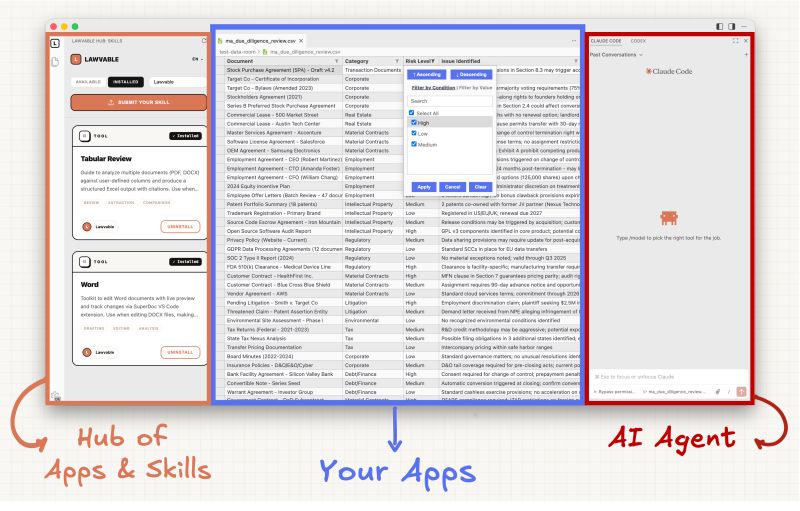
This is how I'm seeing the future of the legal workspace: AI agents that do the work your way with Skills + hyper-customized interfaces for human review with VS Code extensions. Here's a concrete example on a feature most are familiar with: Tabular Review. In the demo below, Claude is given a custom-built Tabular Review skill (link in comment) that lets it perform an extractive analysis of a sample data room. You see it open the documents, read their content, take notes in temporary files, then save all the extracted information in a structured Excel file. That's the agent doing the work in a deterministic way, thanks to the methodology described in that custom skill. Then comes the human review, where interfaces still add real value. In the demo, I'm using an open-source Excel editor extension. It lets you open the sheets directly in VS Code, filter, search, edit. All you need to properly review the agent's work, without ever needing to leave the app. And here's what I find really cool: you can ask Claude to build you an interface. Your own small app, living right inside VS Code, that reflects exactly how you think about the task. You decide what it looks like. For once, the tool adapts to you instead of the other way around. One thing on security though. I'd recommend downloading extensions from organizations you know and trust (ones with a reputation and a face you can hold accountable), just like you would with any software. For the rest, prefer open-source extensions you (or Claude) can inspect. There are many security review skills out there that can perform a deep audit of the code for you. And of course, if you build your own, you control what's in there. Still early. But the pieces are coming together.
A Minimalist Legal AI Interface
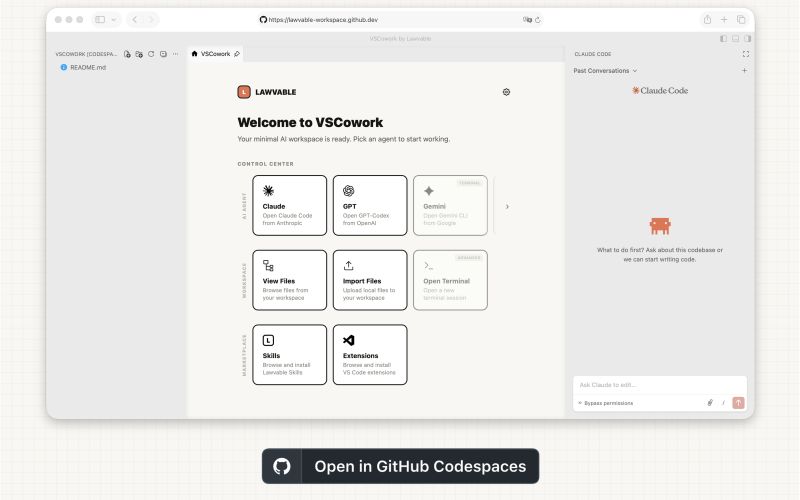
250+ lawyers installed my custom extension that turns an open-source coding app into a minimalist interface ready for AI-assisted legal work. Funny enough, some legal friends of mine recently admitted they did not, because setting up a dev-related desktop app simply felt too complicated. I imagine they're not alone. So in a desire to make what I believe could become the ultimate open-source workspace for legal as accessible as possible, I made the extension compatible with GitHub Codespaces. It's a web version of VS Code you can run from your browser. One-click setup. All you need is a GitHub account. It works as a real workspace. An alternative to the desktop app if you prefer the web convenience. AI agents (cc. Anthropic), Word editing (cc. SuperDoc), legal-specific Skills (cc. Lawvable). All in one completely isolated environment only you can access. Your work automatically persists across sessions. The extension itself also got a major update. A new control center panel, recently updated skills, search and filter exactly like on the website. Much more control for power users too, like choosing which skills or extensions get pre-installed. Still so much to improve though. It's exciting. Two major requests I keep getting: 1. Compliance: run Claude or GPT-Codex via the cloud provider and server location of your choice. 2. Private skill sharing: not everyone wants to publish their custom-built automated workflows publicly on the hub (but would with their team). Eros Chan and I are working on both. Please don't hesitate to tell me what your missing blocks are so we can keep building this open ecosystem together. A huge shoutout to the 250+ practitioners already adopting this more accessible and customizable way of working with frontier AI for legal.
Trying Legal Skills Online
You can now run any legal Agent Skill directly from the Lawvable website! Pick one and try it live. Not meant as a real workspace, more as a tryout. A way to explore what Skills can do in legal before committing to a setup. Everything runs in an isolated environment created just for your session. Your files and messages are processed in its working memory only - never saved, logged, or written to any database. The environment is permanently destroyed when you close the panel or after a few minutes of inactivity. And it runs on your own AI subscription too! No API keys to manage or pay-per-use costs. Just connect and go - your auth token is processed in memory too, nothing persists. If you've been curious about Skills but didn't want to deal with setup, this is probably the easiest way to start. A special thanks to Chad Piatek for the ideas that shaped this, especially around reducing friction and bringing your own subscription. And to my friend and colleague Eros Chan, who's joining the Lawvable movement on the side and built this whole feature.
Getting Started With Legal AI
I made a guide on how to get started with AI workflows in legal, using the most accessible tools available today! • On the web: Claude Chat & Manus AI • On desktop: Claude Cowork & OpenAI Codex What I like about Skills is not the format per se (a folder of prompts, scripts, and other assets). It's that this format is portable and has become a standard. Write your automation once, use it anywhere. No vendor lock-in, ever. Today you run it with Claude, tomorrow with whatever model is best. And adoption is growing fast across the industry! Beyond the tools listed above, anyone comfortable with the terminal can also run Skills in Claude Code, Google Gemini, Mistral Vibe, and many others. I think more lawyers should see what AI agents can do, and I hope this guide helps someone get started. And if you want to see what Skills for legal work look like in practice, check out what the Lawvable contributors have built.
Toward a Legal Everything App
I keep thinking about the idea of an "everything app" for legal work. Lawyers are building incredible personalized tools right now. With the cost of software going down, we're entering an era of hypercustomization. What if these custom apps could live in the same open-source interface I've been exploring over the past few weeks? VS Code. VS Code has a whole ecosystem of "extensions". Portable JS/TS apps with a Node.js backend plus a sandboxed browser for custom UIs. Extensions are packaged as a single compressed file you can share via email or message. One-click install in VS Code and it works. No Git clone. No environment setup. No terminal. And there's a public marketplace for sharing them. Active since 2015. Imagine the legal community sharing tools there. Looking for a tabular review app? Search the marketplace (most are open-source, inspectable). Don't find what you want? Build it with Claude. What's more: your AI agents already live in VS Code (Claude, Codex, Gemini all have their extension). Your custom app could leverage them using the subscription you're already paying for. No extra API keys. No pay-per-token. That's exactly how I made Claude talk to SuperDoc for the live Word editing — not straightforward in VS Code as extensions don't natively communicate, but doable with some tricks. This obviously won't replace deploying an app online. VS Code extensions have many limitations (no real-time collaboration, no shared database). But for a solo practitioner or small team that just needs a tool running locally? This could definitively be a viable alternative. So I keep wondering if: AI agents - Portable workflows (Skills) - Full Word editing (SuperDoc) - Personalized UIs (VS Code extensions) = The Everything App for Legal?
Building a Legal Skills Hub
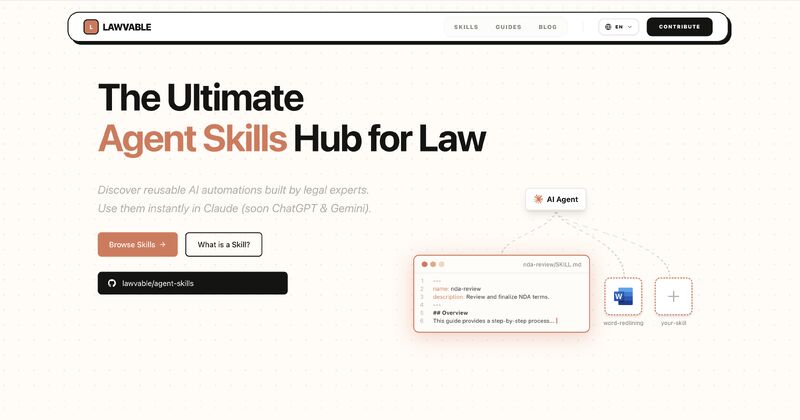
Took on a little side project over the winter holidays. A hub where legal practitioners can learn about and share what I believe may be the future of legal automation: Agent Skills. Skills are reusable packages that teach AI agents how you work. They're surprisingly simple. A folder with instructions and custom materials (templates, playbooks, etc.) that an agent follows to perform highly-specialized tasks with consistency. The format was created by Anthropic for Claude but recently became an open standard. Others, like OpenAI, are starting to adopt it. The hub is small for now. A few Skills for GDPR compliance built by my friend Malik Taiar to demonstrate their unique potential. I want my legal friends to know about this. I believe in a future where legal expertise becomes more open, collaborative, and actionable. And Skills make that possible. They let you package how you work, share it, and have AI agents apply it consistently. If this resonates, I'd love to help you get started: tutorials, walkthroughs, or just sharing what I've learned. Whatever's useful. Malik and I will be sharing more thoughts on Substack if you want to follow along: lawvable.substack.com. And the Lawvable hub is live at lawvable.com. Excited to see where this goes!
Bringing AI to Document Work
What if the interface that made developers so productive with AI could finally reach document work? One problem keeps coming up: Microsoft Word. The docx/OpenXML format is notoriously hard for AI to work with. Programmatically editing the file's internals is brittle and often leads to corrupted documents or broken formatting. Some have called this the last-mile problem, preventing real "Cursor for lawyers" type experiences from existing, where an AI sees your entire workspace, understands your templates and playbooks, and can draft, revise, and redline autonomously while you watch. Last week, SuperDoc released an open-source extension that brings full Word editing into VS Code, the exact same environment that made developers so productive with AI. I built a small proof of concept on top of it that lets AI agents actually control the editor. Not a full solution, just a glimpse of what could be possible: - Live visual feedback: watch track changes appear as the agent works - Proper Word semantics: comments, formatting, redlines - Context beyond the document: the agent sees your entire project - Multi-document potential: open 10 contracts, update them all at once - No tool switching: agents and documents in the same interface - Open-source and extensible (not locked into any vendor) The proof of concept is two things: a fork of the SuperDoc extension (happy to merge if it turns out useful) and an Agent Skill that teaches the model how to interact with it. It's not perfect. Probably misses many edge cases. But it's a start. And I'm confident the SuperDoc team will get there with the help of the community. If you want to try it yourself, I made it part of the Lawvable preset. Setup guide here. Contact me if anything goes wrong!