Claude Code for Non-Coders

1 min read 8 views
Claude Code isn't only about code. Anthropic personnel predict the Claude Code experience for all knowledge work is coming in 2026.
Here is how to start using it as a non-coder:
Step 1: Download VS Code (a free desktop application)
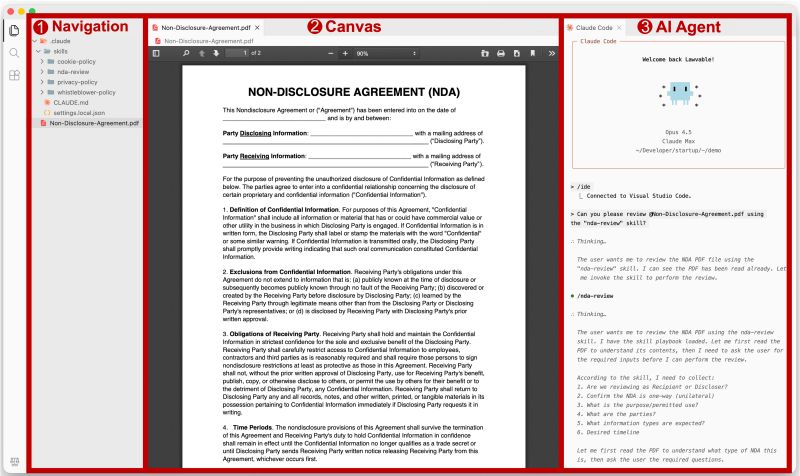
Step 2: Use this 3-column setup
- Left: Navigation (your files and folders)
- Center: Canvas (where you view and edit your docs)
- Right: AI Agent (where most of the work happens now)
I believe this is the simplest way to experience the power of Claude Code if you want an interface around it. It's free and open-source. You need nothing more.
But VS Code can feel intimidating. It's built for developers. Buttons, options, jargon everywhere. A customization paradise, but far from beginner-friendly.
So I made a preset for my legal friends who wanted to start experimenting. One click to import, and your interface immediately looks like the picture below.
You don't have to configure anything. No terminal. No commands. The Lawvable preset handles it all:
- Minimal 3-column layout set up for you w/ light theme and clean icons
- Pre-installed extensions for previewing PDF, Word, Excel, PowerPoint
- Claude Code installed and launched automatically at startup
- Everything customizable if you want to go deeper later